Using PRE-FAB · Lesson 09
Check Geometry for a Fabrication Process
Introduce PRE-FAB's manufacturing-interpretation layer without turning a profile into a promise of manufacturability. The learner starts with intrinsically clean geometry, enables fabrication checks, compares real profiles, reads process-sensitive findings and limitations, and learns when a custom threshold is justified by external evidence.
What you'll learn
- Distinguish intrinsic geometry checks from optional fabrication thresholds.
- Enable and disable Enable fabrication checks without expecting geometry to change.
- Choose among the verified fabrication profiles.
- Read process-sensitive findings, profile thresholds and explicit limitations together.
- Understand why the same valid feature can be clear in one profile and flagged in another.
- Change a threshold only when an authoritative process requirement supports it.
- Record a review decision without claiming manufacturing certification.
Start from geometrically clean geometry
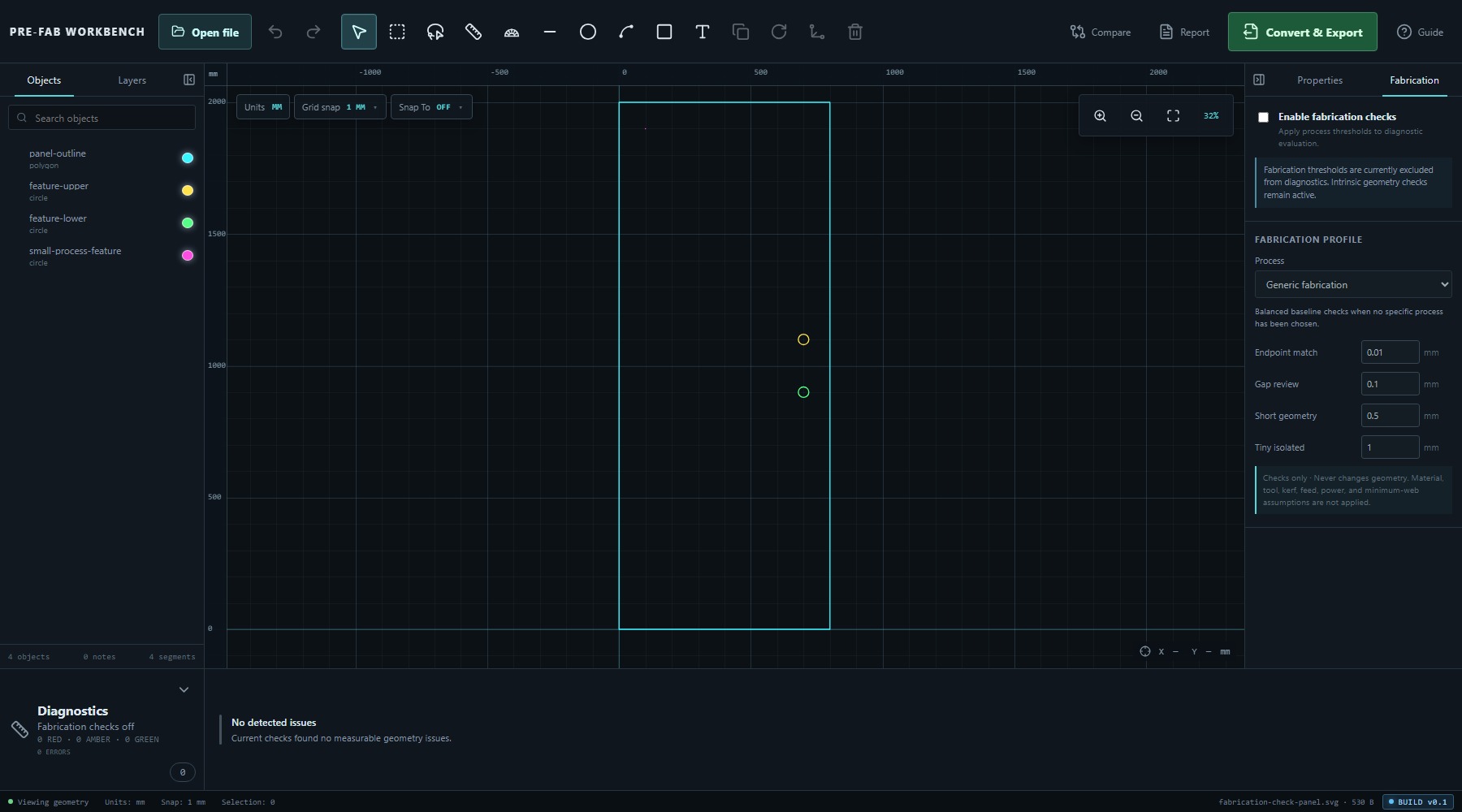
Open fabrication-check-panel.svg. The drawing is an 800 × 2000 mm rectangular panel with two Ø40 mm circles and one Ø0.4 mm isolated circular feature. It contains four objects and four segments. With fabrication checks off, Diagnostics reports no detected issues.
This clean starting point matters. The small feature is valid geometry; the question in this lesson is whether it deserves process-specific review. That is a different question from whether the file is geometrically valid.
Geometry checks and fabrication checks
Open the Fabrication tab in the right panel. When Enable fabrication checks is off, PRE-FAB states: Fabrication thresholds are currently excluded from diagnostics. Intrinsic geometry checks remain active.
Turning fabrication checks off therefore does not turn Diagnostics off. Duplicates, zero-length geometry, open contours and other intrinsic findings remain independent. The switch controls only whether the selected profile's fabrication thresholds participate in diagnostic evaluation.
Enable fabrication checks
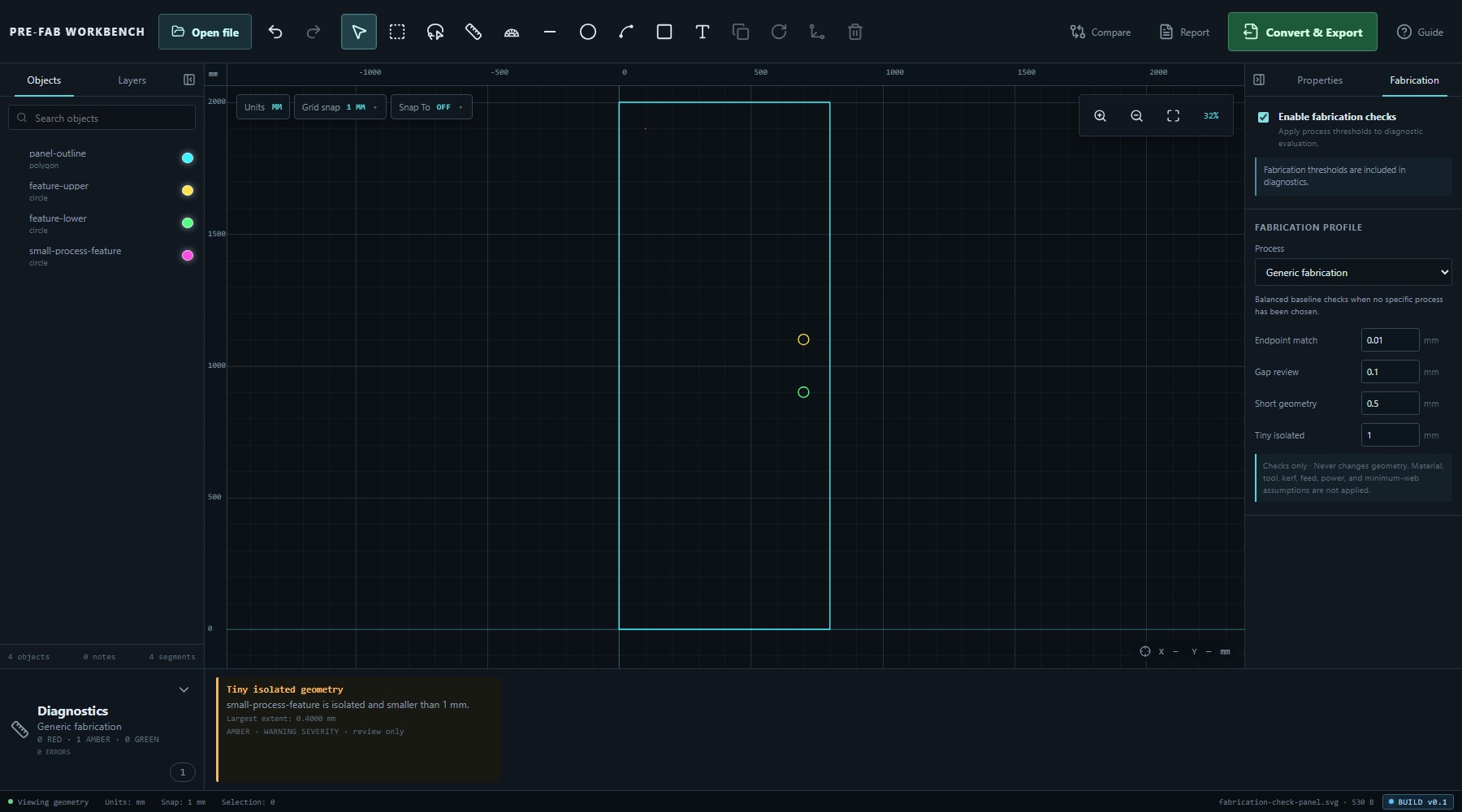
Select Enable fabrication checks. PRE-FAB confirms: Fabrication thresholds are included in diagnostics. The panel also states Checks only · Never changes geometry.
The active profile, its thresholds and its limitations now become part of the review. Enabling the checks does not resize, delete, join or otherwise edit any object.
- Open the Fabrication tab.
- Select Enable fabrication checks.
- Read the active Process name.
- Review its four threshold values and limitation statement.
- Read any new Diagnostics cards before making a decision.
Choose a process profile
The verified Process choices are Generic fabrication, Laser cutting, Laser engraving, CNC routing and Plasma cutting. Each profile provides four editable thresholds: Endpoint match, Gap review, Short geometry and Tiny isolated.
The supplied defaults are starting criteria for review:
- Generic fabrication: Endpoint match 0.01 mm; Gap review 0.1 mm; Short geometry 0.5 mm; Tiny isolated 1 mm.
- Laser cutting: Endpoint match 0.005 mm; Gap review 0.05 mm; Short geometry 0.15 mm; Tiny isolated 0.25 mm.
- Laser engraving: Endpoint match 0.01 mm; Gap review 0.05 mm; Short geometry 0.1 mm; Tiny isolated 0.15 mm.
- CNC routing: Endpoint match 0.01 mm; Gap review 0.1 mm; Short geometry 0.5 mm; Tiny isolated 1 mm.
- Plasma cutting: Endpoint match 0.05 mm; Gap review 0.5 mm; Short geometry 1.5 mm; Tiny isolated 3 mm.
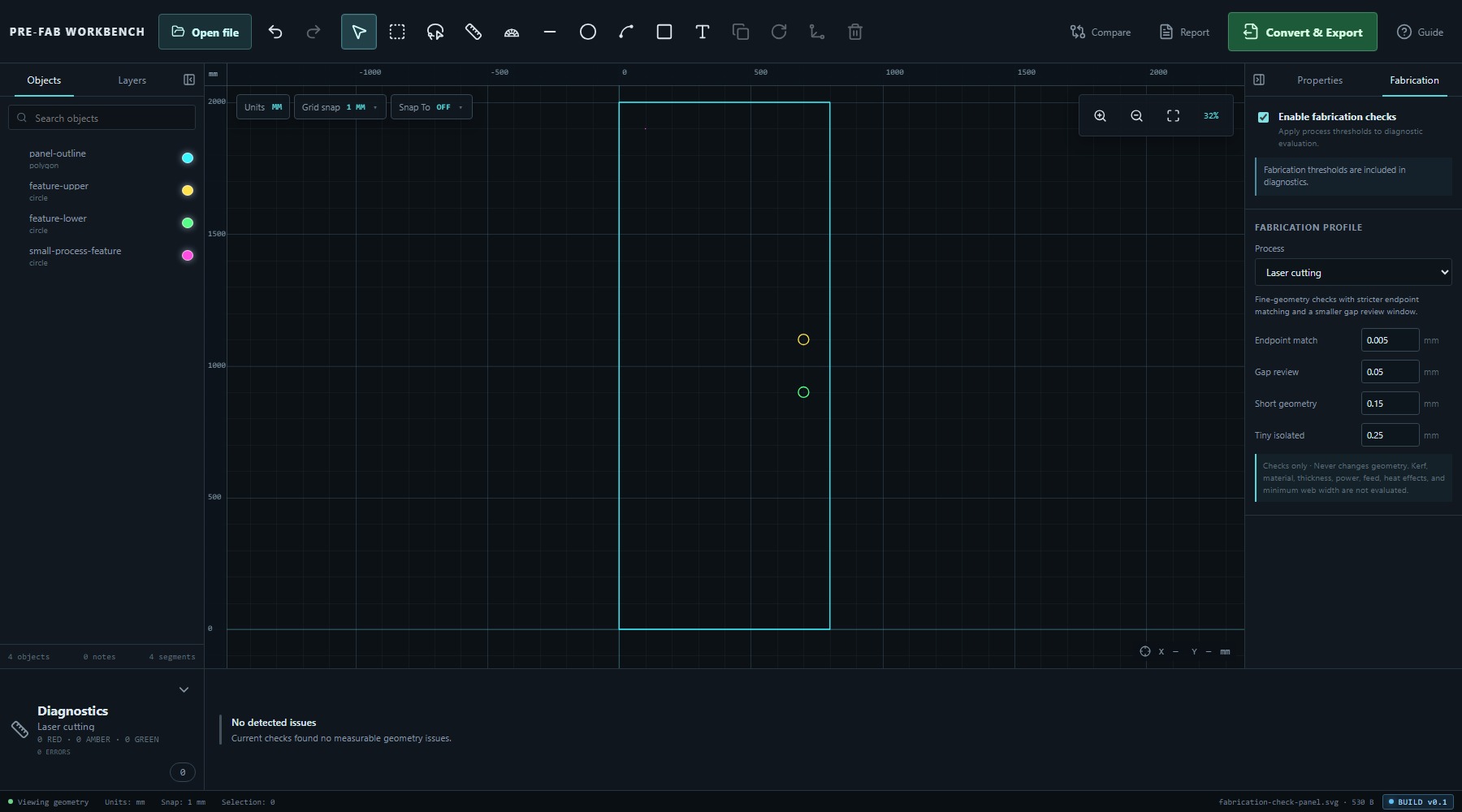
Choose the profile that matches the intended receiving process closely enough to support review. If the real process is unknown, record that uncertainty rather than treating a convenient profile as approval.
Read process-sensitive findings
Under Generic fabrication, the Ø0.4 mm feature produced one AMBER Tiny isolated geometry finding because its 0.4000 mm extent was below the profile's 1 mm threshold. The card was marked WARNING severity, review only and PROFILE FOCUS.
Under Plasma cutting, the same feature produced two review findings: RED Very short geometry because its 1.2566 mm circumference was below the 1.5 mm short-geometry threshold, and AMBER Tiny isolated geometry because its 0.4000 mm extent was below 3 mm.
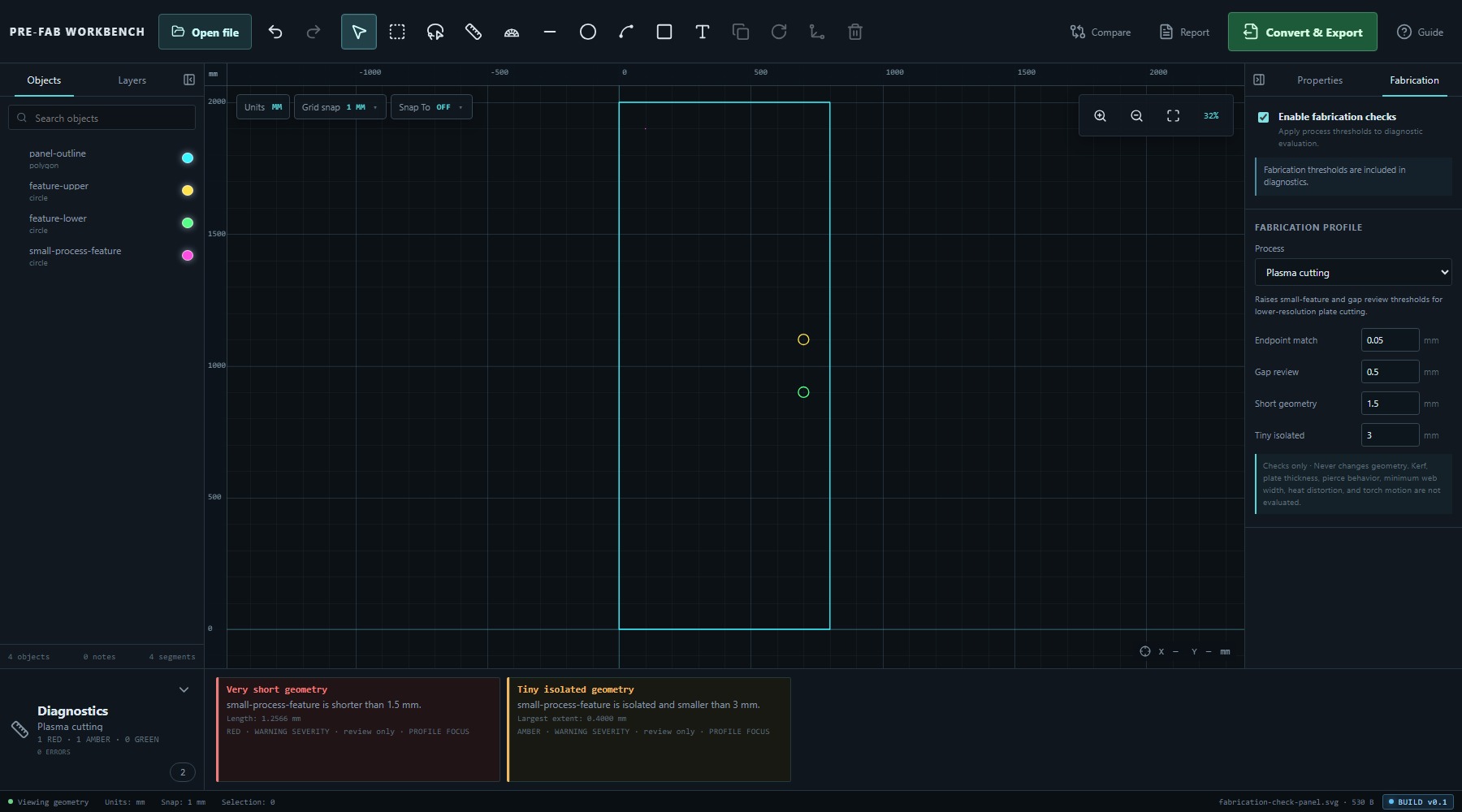
The measurements are facts about the feature. The colours and threshold comparisons are interpretations under the active profile. A review-only finding asks for a decision; it does not silently remove the feature.
Compare profiles without chasing green
The Ø0.4 mm feature produced no finding under the verified Laser cutting or Laser engraving defaults, one AMBER finding under Generic fabrication and CNC routing, and two findings under Plasma cutting.
That difference is the point of the profile system. The feature did not become more or less geometrically valid when the Process changed. Only the process lens changed.
Do not switch profiles merely to obtain a clear summary. Use the intended process, then investigate or accept findings with documented evidence. No detected issues means no active checks found a measurable issue; it does not mean the part is certified for the machine.
Adjust thresholds only from evidence
Profile thresholds are editable positive numbers. Gap review must be greater than Endpoint match. In the verified exercise, changing Generic fabrication's Tiny isolated threshold from 1 mm to 0.3 mm removed the finding because the feature's 0.4000 mm extent was then above that threshold.
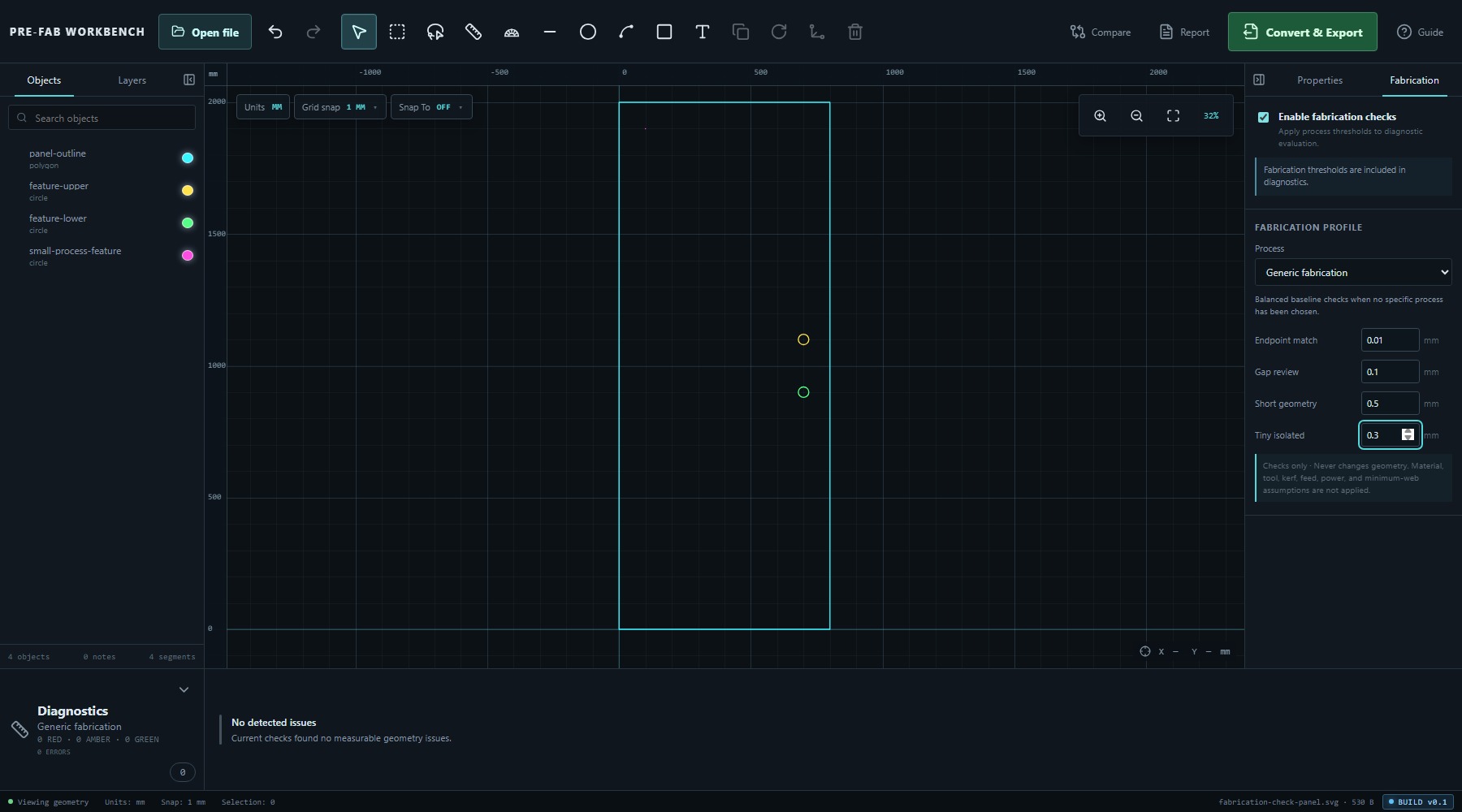
This demonstrates how thresholds work; it is not a recommendation to clear a card. Change a threshold only when a documented machine, tool, material, supplier or organisational rule provides the value. Retain that evidence with the review.
Understand profile limitations
Every verified profile states what it does not evaluate. Generic fabrication does not apply material, tool, kerf, feed, power or minimum-web assumptions. Laser cutting does not evaluate kerf, material, thickness, power, feed, heat effects or minimum web. Laser engraving does not evaluate fill/stroke intent, raster behaviour, power, speed, material response or tonal output.
CNC routing does not evaluate tool diameter, inside-corner radius, depth, feeds, speeds, workholding or collision risk. Plasma cutting does not evaluate kerf, plate thickness, pierce behaviour, minimum web, heat distortion or torch motion.
These exclusions are part of the result, not fine print. PRE-FAB exposes threshold-based findings; it does not guess the missing manufacturing intent.
Record the review decision
Before release, record the intended process, the active profile, any changed thresholds and their source, each accepted or unresolved finding, and the profile limitations that still require downstream checking.
A useful decision is explicit: the feature is retained, revised or removed for a stated process reason. No detected issues is evidence about the active checks only. Final approval still belongs to the qualified downstream workflow using actual material, machine and tooling information.
Common mistakes / things to notice
- Turning fabrication checks off does not disable intrinsic Diagnostics.
- Enabling or changing a profile never changes geometry.
- A feature can be geometrically valid and still deserve process review.
- Confidence colour and severity are separate fields; read both.
- Switching profiles to get a clear result is not a valid review method.
- No detected issues is limited to the active checks and thresholds.
- Editing a threshold to hide a finding is not evidence-based review.
- Profile limitations identify important missing inputs such as kerf, tool diameter, material and heat effects.
- Export validation and fabrication suitability answer different questions.
Key points
- Intrinsic geometry facts remain distinct from manufacturing interpretation.
- Enable fabrication checks adds the selected profile's thresholds to Diagnostics.
- The verified profiles are Generic fabrication, Laser cutting, Laser engraving, CNC routing and Plasma cutting.
- Endpoint match, Gap review, Short geometry and Tiny isolated are explicit review thresholds.
- The same feature can produce different findings under different profiles without changing geometry.
- Custom thresholds require authoritative external evidence.
- Profile findings are checks only and never change geometry.
- A clear profile result is not manufacturing certification.